LICENSE PLATE RECOGNITION FOR MONTHLY PARKERS
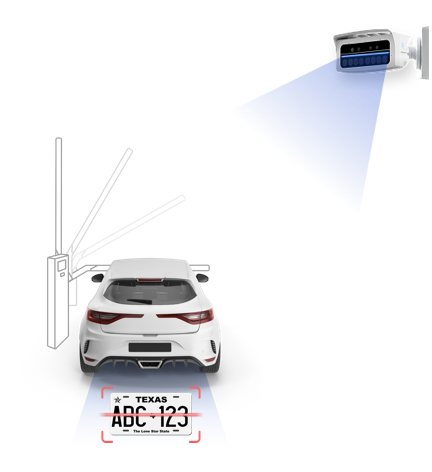
How LPR Works for Monthly Parkers
The basic workflow for LPR is as follows:
- A vehicle triggers the LPR camera.
- The LPR camera captures an image of the license plate.
- The captured plate data is sent to Flash and recognized as a Monthly credential
- The system automatically creates a parking ticket associated with the monthly account.
- When the vehicle triggers the arming loop at the kiosk, the gate opens.
- The system records the entry for that monthly ticket without requiring the parker to take any action at the kiosk.
This allows monthly parkers to enter hands-free using license plate recognition.
Backup Credential Recommendation
While LPR provides a convenient, hands-free experience for monthly parkers, it should not be the only access method configured for the facility.
Operators should ensure monthly parkers are issued at least one backup credential; such as a proximity card, mobile credential, or barcode to use in the following scenarios:
- The license plate is not captured or is misread
- The vehicle enters in poor lighting or adverse weather conditions
- The license plate is obscured, damaged, or temporarily changed
Having a backup credential helps prevent lane blockages, reduces the need for intercom assistance, and ensures consistent access for monthly parkers when LPR is unavailable.
Monthly Parker Conversion After Transient Entry (LPR)
A parker may enter the facility as a transient and pull a ticket at entry. If LPR is enabled, the system reads the vehicle’s license plate and begins a transient parking session tied to that ticket.
If the parker signs up for monthly parking during the same visit, the parking office adds the vehicle’s license plate to the new monthly account. Once the plate is added, the system automatically converts the active transient session to a monthly entry activity.
Because the license plate is already associated with an active monthly account, the parker can exit seamlessly using LPR without scanning a ticket or stopping at the exit.
Was this article helpful?
That’s Great!
Thank you for your feedback
Sorry! We couldn't be helpful
Thank you for your feedback
Feedback sent
We appreciate your effort and will try to fix the article