FEES AND TAXES
Taxes and Fees allow parking operators to define additional charges that can be applied to parking transactions for Flash Valet tickets. Based on the configured Taxes and Fees, they are added to a customer’s parking fee and displayed as separate line items on the parking receipt and in reporting.
Fees and Taxes require Flash Valet version 4.0.7.21 or later.
Reach out to Flash Support for implementation.
Added fees and/or taxes can be configured as a single Fee Structure or independently, and are automatically calculated and displayed on the Confirm Price screen.
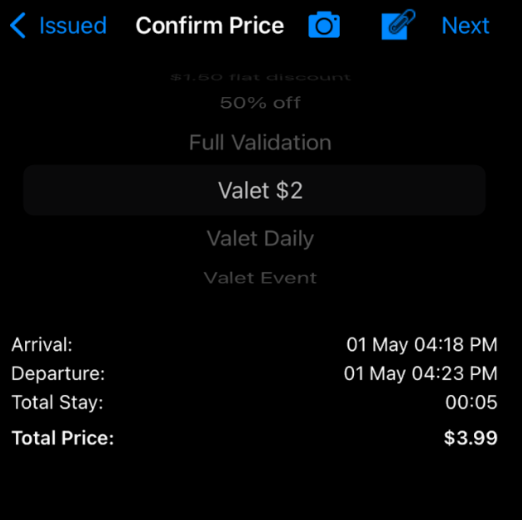
If a Credit Card Fee has been configured, it is calculated only if the customer is paying with a Credit Card.
The fees or taxes are not itemized on this screen; the breakdown is only provided in receipts and reporting.
The Flash Valet itemized receipt supports all receipt options (printed, SMS, and email).
Compatibility
Fee Calculation
Fees are added to the parking total and are summarized in the Confirm Price screen; for this reason, only the total after calculation will be available for confirmation.
The list below shows varying Fee Types:
- Credit Card Flat Fee: non-recurring flat fee that gets added to the parking total, e.g., CC Fee = $.75.
- Credit Card Percentage Fee: non-recurring percentage fee that gets calculated and added to the parking total, e.g., CC Fee = 2.5%.
- Flat Fee: non-recurring, flat dollar amount that is added to the parking total, e.g., Port Fee = $1.25.
- Flat Fee Per Time Period: recurring, flat dollar that is calculated as a Daily amount, an Hourly amount, or an amount by Minute, e.g., Daily Fee = $5.00, Hourly Fee = $1.00, Minute Fee = $.25.
- Percentage Fee: non-recurring fee that is calculated as a percent of the Parking Fee, e.g., 5% of $15.00 = $.75.
- Percentage Fee per Time Period: recurring fee that is calculated as a percentage of the Parking Fee by Day, by Hour or by Minute, e.g., Daily Percent Fee = 5%, Hourly Fee = 2%, Minute Fee = 1%.
Tax Calculation
Taxes can be added to the summary of the Confirmation screen in the same way as fees, depending on the state requirements for each location.
The list below shows varying Tax Types:
- Flat Tax: non-recurring, flat dollar amount that is added to the parking total, e.g., Port Fee = $1.25.
- Flat Tax Per Time Period: recurring, flat dollar that is calculated as a Daily amount, an Hourly amount, or an amount by Minute, e.g., Daily Fee = $5.00, Hourly Fee = $1.00, Minute Fee = $.25.
- Percentage Tax: non-recurring fee that is calculated as a percent of the Parking Fee and/or any selected Fees associated with the Fee Structure, e.g., 5% of $15.00 = $.75.
- Percentage Tax per Time Period: recurring fee that is calculated as a percentage of the Parking Fee and/or any selected Fees associated with the Fee Structure by Day, by Hour or by Minute, e.g., Daily Percent Fee = 5%, Hourly Fee = 2%, Minute Fee = 1%.
Fees and Taxes Reporting
Fees and taxes can be seen summarized in certain web and Excel format reports, such as:
- Location Fees and Taxes export

- Vehicle Percentages and Revenue by Fee (xls)

Was this article helpful?
That’s Great!
Thank you for your feedback
Sorry! We couldn't be helpful
Thank you for your feedback
Feedback sent
We appreciate your effort and will try to fix the article