“HOW DO I CANCEL AN EXPRESS PAY SESSION?”
Description
A driver needs to cancel their current parking session without unenrolling their vehicle from the Express Pay program.
Agent Instructions & Details
| 1. Instruct the driver to tap the link in the SMS message they received when their Express Pay session started. | 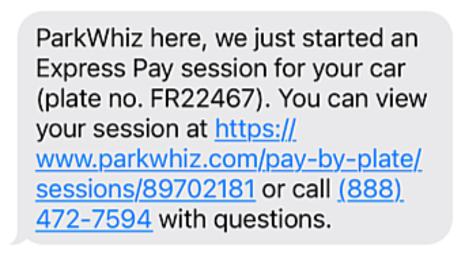 |
| 2. Once the digital ticket loads, direct the driver to tap “Help with my parking visit”. The ‘Help with my parking visit’ button is found at the bottom of the screen and the driver may have to scroll down to find it. | 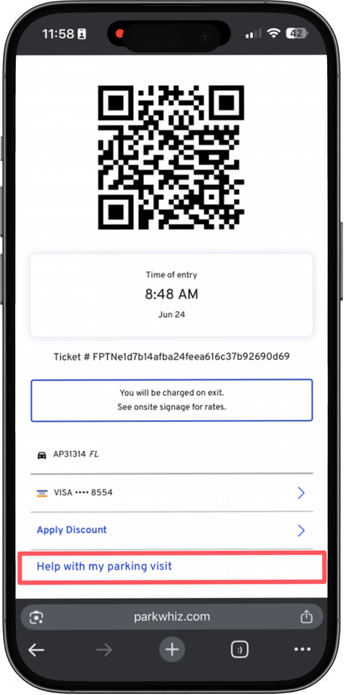 |
| 3. Direct the driver to tap “Cancel session”. This cancels the current parking session but leaves their license plate enrolled in Express Pay for future use if they are an enrolled user. | 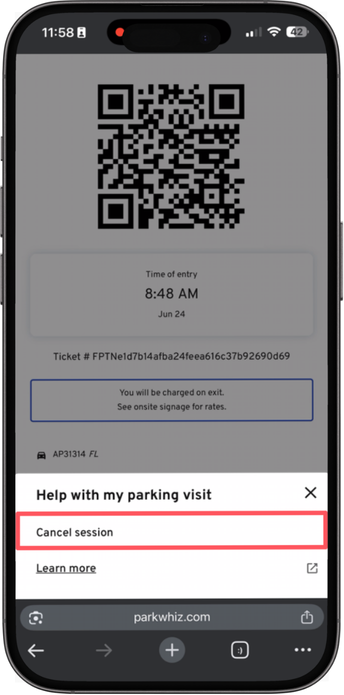 |
| 4. Direct the driver to tap “Yes, cancel my session” to confirm the cancellation. | 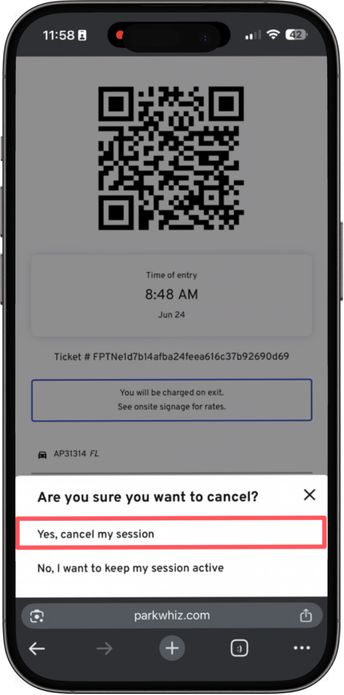 |
| 5. Inform the driver that a transient ticket barcode will be provided. The barcode can be used to access pedestrian doors or to initiate validation or payment at a Pay On Foot station or the exit kiosk. | 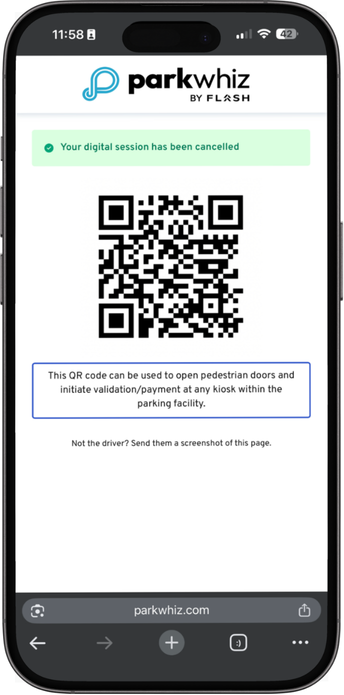 |
Was this article helpful?
That’s Great!
Thank you for your feedback
Sorry! We couldn't be helpful
Thank you for your feedback
Feedback sent
We appreciate your effort and will try to fix the article