PARKONECT MOBILE NUMBER ENTRY OPTION
Mobile Number Entry, also referred to as 10-Key Entry, enables a numeric keypad on the entry kiosk screen that allows drivers to use their mobile phone number as their access credential.
When a driver enters their phone number:
- The number is captured as their access method.
- The system sends an SMS welcome message.
- The SMS contains a secure payment link to complete checkout.
This provides a streamlined, ticketless entry experience and supports multiple digital payment workflows.
This module is activated at the location level and cannot be configured for individual kiosks.How it Works
1. Choose Your Entry Method: At the kiosk, you can either enter your mobile phone number or pull a ticket. To use the ticketless option, press the Ticketless Entry button on the screen. | 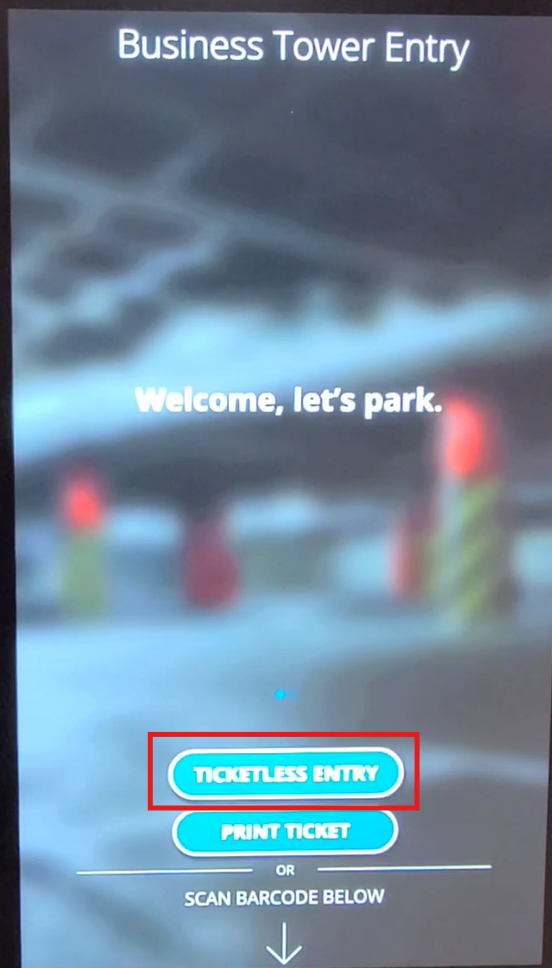 |
2. Enter Your Phone Number: Type in your mobile phone number and tap the Open Gate button. | 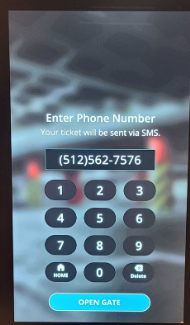
|
| 3. Receive Your Welcome SMS: Once the gate opens, you’ll receive a text message with a warm welcome and a link for payment. | 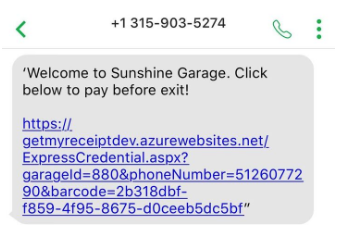 |
4. Access Your Ticket: Click on the link in the SMS to view your ticket’s QR code. You can use this QR code at the exit or at other PARCS stations, such as the validation station or door reader. | 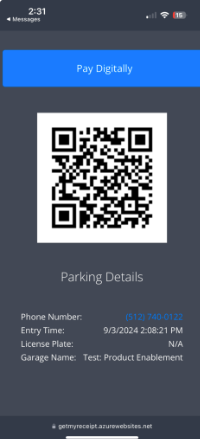 |
5. Pay Digitally: If you choose to pay online, you will be redirected to your preferred payment platform (Express Pay, DTC, or Parking Cashier). | 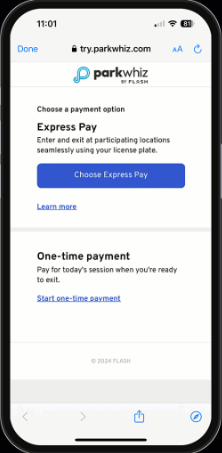 Example: Express Pay and DTC are both enabled |

Was this article helpful?
That’s Great!
Thank you for your feedback
Sorry! We couldn't be helpful
Thank you for your feedback
Feedback sent
We appreciate your effort and will try to fix the article