"I ENTERED THE GARAGE BUT RECEIVED A TEXT MESSAGE THAT MY EXPRESS SESSION DIDN'T START"
Description
The system recognized the license plate at entry, but blocked a new session from starting, usually due to one of several reasons listed below.
Agent Instructions & Details
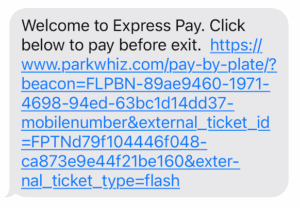
- Cause 1 - Returning Driver Receiving a "Welcome" SMS (Proactive Comms): The driver previously used Express Pay for a one-time payment but did not enroll their license plate for automatic sessions. The system recognizes the phone number and plate, but by design will not start a session automatically. Instead, Proactive Comms sends an SMS with a link to encourage repeat use.
- Cause 2 - Mobile Number Entry (10-Key) but Unable to Complete Registration: The driver entered their mobile number at the entry kiosk, received the SMS link, but the session fails to start because the license plate state was not captured or auto-filled.
- Cause 3 - Enrolled User Receives "Unable to Start Session" SMS:
- Cause A: A prior session is still open (Missed LPR Exit): If the vehicle previously exited without an LPR read, the prior session remains open in ParkWhiz (since ParkWhiz does not have auto-close / soft-close). A new session cannot start while an existing one is open.
- Cause B: Multiple vehicles entered under the same account: If multiple vehicles registered under the same ParkWhiz account enter simultaneously, active session conflicts occur.
Cause 1: Returning Driver Receiving a "Welcome" SMS (Proactive Comms).Action: Guide the driver through the following steps:
|  |
Cause 2: Mobile Number Entry (10-Key) but Unable to Complete Registration.Action: Instruct the driver to manually enter their license plate state on the Express Pay mobile page to complete the start flow. | 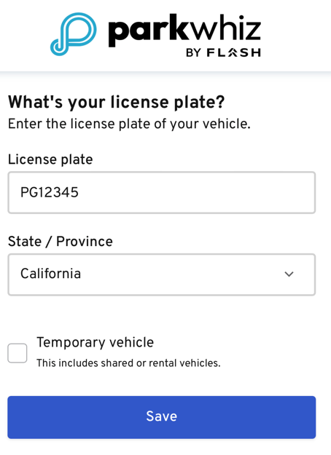 |
Cause 3: Enrolled User Receives "Unable to Start Session" SMS.Action: Cause A: A prior Session is still open (missed LPR Exit) In order to solve this issue and ensure the customer’s account is updated cleanly, gather the customer’s details and submit an official invalidation request directly to ParkWhiz Support. To get this processed, request the following details:
In Parkonect Admin, check the Garage Log (filter by plate or phone number) and click Logout on the open Parkonect ticket if it is still hanging open. Cause B: Multiple vehicles entered under the same account Advise the driver to maintain separate ParkWhiz accounts per license plate. The second vehicle will need to pay standard transient rates at exit via LPR Auto-Present or kiosk. | |
Exit Fallback Options if Express Pay Cannot Be StartedIf the driver is unable to get the session started during their stay: Drivers can open the digital ticket link in the SMS and scan the generated QR code at a Pay-on-Foot (POF) or exit kiosk. In Full Control mode, they can scan their physical paper ticket or pay the fee presented via LPR at the exit kiosk. | 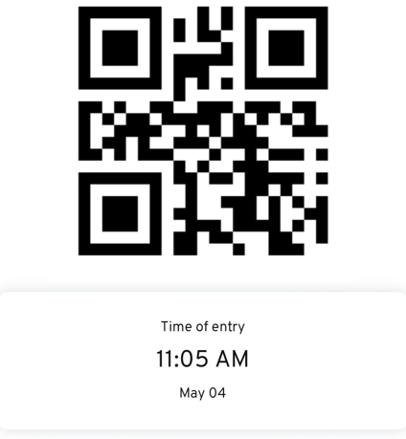 |
Was this article helpful?
That’s Great!
Thank you for your feedback
Sorry! We couldn't be helpful
Thank you for your feedback
Feedback sent
We appreciate your effort and will try to fix the article