How to clear Orphaned Sessions via Parkonect Admin "Logout"
Description
When an attendant manually opens a gate to vend a driver without scanning their credential, the associated Express Pay session and Parkonect ticket remain in "Open" status. As long as this session remains unresolved, the system will block the driver from initiating any future Express Pay sessions.
Agent Instructions & Details
1. In order to solve this issue and ensure the customer’s account is updated cleanly, gather the customer’s details and submit an official invalidation request directly to ParkWhiz Support. To get this processed, request the following details:
Call Script for Client: "Perfect, thank you! I have compiled all of your information and am submitting this request. Your ticket will be invalidated. Is there anything else I can assist you with today?" | |
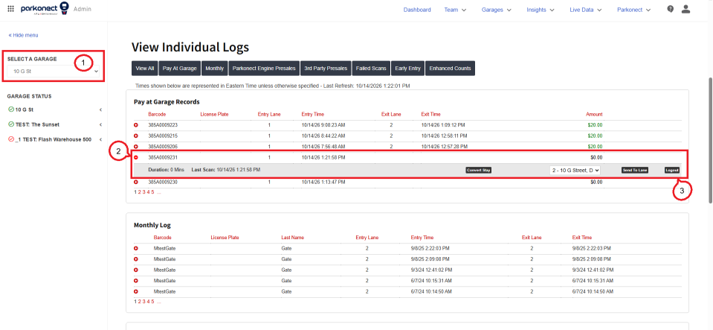
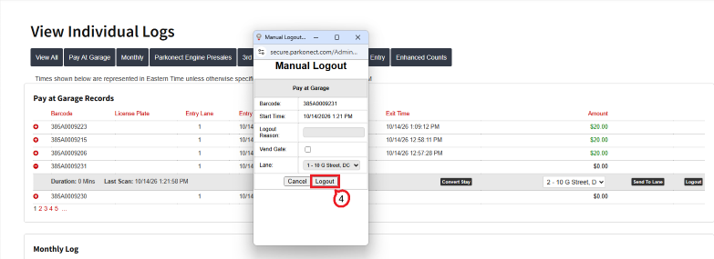
2. Close the Parkonect ticket in Parkonect Admin: Log in to the Parkonect Admin portal.
Call Script for Client: "I’ve closed your ticket in the dashboard and requested Support to cancel the Express Pay session so you aren’t overcharged. All set on our end! Please make sure to contact the towing company for you to retrieve your vehicle." | |
Was this article helpful?
That’s Great!
Thank you for your feedback
Sorry! We couldn't be helpful
Thank you for your feedback
Feedback sent
We appreciate your effort and will try to fix the article