Customer Scenario
"I registered my plate in Express Pay, and I'm at the exit, but the gate isn't vending. It seems your cameras have a recognition problem."
What Likely Happened
Entry LPR successfully matched the license plate to an active Express Pay session.
- Exit LPR failed to read or match the plate.
- The system could not automatically close the session.
This is typically a plate read failure at exit, not an Express Pay enrollment issue.
Immediate Operator Guidance
Educate the Parker on Backup Credential
Express Pay users automatically receive a digital ticket via SMS at session start.
If LPR does not recognize the plate at exit, instruct the parker to:
- Open their Express Pay SMS message
- Tap the link
- Display the QR code
- Scan the QR code at the exit kiosk
Result:
- The session will close
- The credit card on file will be charged
- The gate will vend normally
This functions as a backup credential when LPR recognition fails
Express Pay Session Started SMS Notification 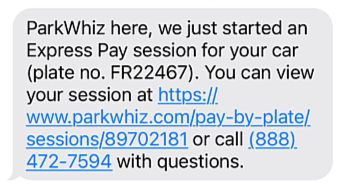 | QR Code provided as a digital ticket 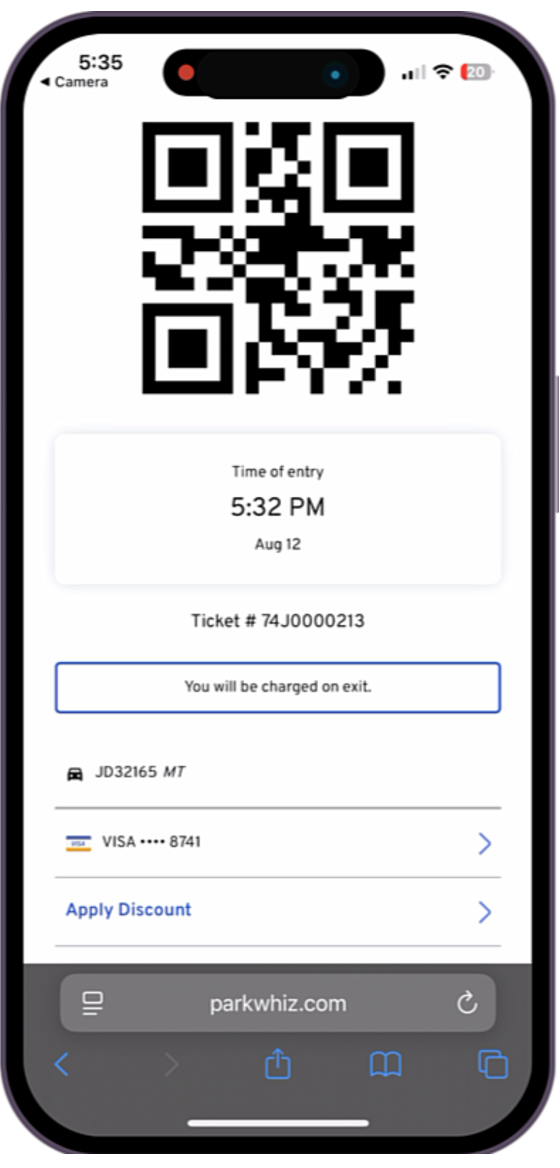 |
Was this article helpful?
That’s Great!
Thank you for your feedback
Sorry! We couldn't be helpful
Thank you for your feedback
Feedback sent
We appreciate your effort and will try to fix the article